How to get to ~/Library folder on MacOS
Last update April 09, 2026 / This article concerns Mac OS X users only
On MacOS, our plugins save things like your license information, settings, and presets in a specific folder on your computer:
~/Library/Application Support/D16 Group/[pluginname]
In this path [pluginname] is the name of the plugin you are using
The ~ symbol represents your user’s home directory. The ~/Library folder is often hidden in Finder and may not be visible by default.
If you cannot see it, use this method to get here:
-
Open Finder.
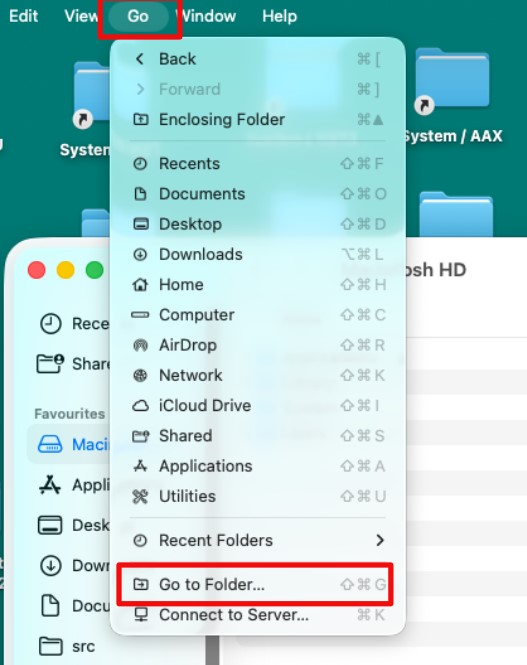
From the Go menu, choose Go to Folder…
-
Type: ~/Library
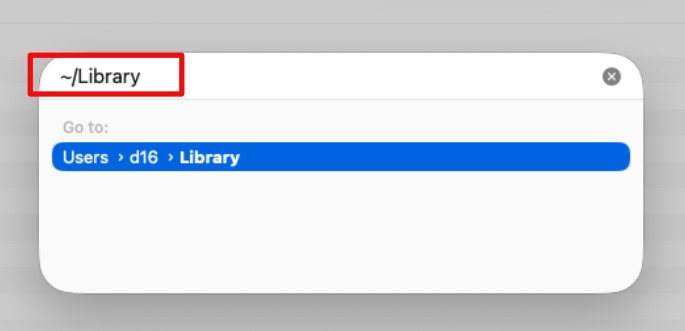
Finder will open the hidden Library folder.
Navigate to Application Support -> D16 Group.
This will take you directly to the folder where our plugins store their files.
From there, open the [pluginname] folder to access or manage your plugin’s files (for example, to back them up or delete them).